
is now in public beta!
Published on: August 6, 2025
10 min read
Measuring AI ROI at scale: A practical guide to GitLab Duo Analytics
Learn how to transform raw usage data into actionable business insights and ROI calculations with this in-depth tutorial.


AI investment starts with measurement. Building a successful AI-powered development platform begins with understanding actual usage, adoption patterns, and quantifiable business value — especially ROI from GitLab Duo Enterprise.
To help our customers maximize their AI investments, we developed the GitLab Duo Analytics solution as part of our Duo Accelerator program — a comprehensive, customer-driven solution that transforms raw usage data into actionable business insights and ROI calculations. This is not a GitLab product, but rather a specialized enablement tool we created to address immediate analytics needs while organizations transition toward comprehensive AI productivity measurement.
This foundation enables broader AI transformation. For example, organizations can use these insights to optimize license allocation, identify high-value use cases, and build compelling business cases for expanding AI adoption across development teams.
A leading financial services organization partnered with a GitLab customer success architect through the Duo Accelerator program to gain visibility into their GitLab Duo Enterprise investment. Together, we implemented a hybrid analytics solution that combines monthly data collection with real-time API integration, creating a scalable foundation for measuring AI productivity gains and optimizing license utilization at enterprise scale.
The challenge: Measuring AI ROI in enterprise development
Before implementing any analytics solution, it's essential to understand your AI measurement landscape.
Consider:
-
What GitLab Duo features need measurement? (code suggestions, chat assistance, security scanning)?
-
Who are your AI users? (developers, security teams, DevOps engineers)?
-
What business metrics matter? (time savings, productivity gains, cost optimization)?
-
How does your current data collection work (manual exports, API integration, existing tooling)?
Use this stage to define your:
-
ROI measurement framework
-
Key performance indicators (KPIs)
-
Data collection strategy
-
Stakeholder reporting requirements
Sample ROI measurement framework

Step-by-step implementation guide
Important: The solution below describes an open source approach that you can deploy in your own environment. It is NOT a commercial product from GitLab that you need to purchase. You should be able download, customize, and run this solution free of charge.
Prerequisites
Before starting, ensure you have:
-
Python 3.8+ installed
-
Node.js 14+ and npm (for React dashboard)
-
GitLab instance with Duo enabled
-
GitLab API token with read permissions
-
Basic terminal/command line knowledge
1: Initial setup and configuration
Let's set up the project environment by first cloning the repository.
git clone https://gitlab.com/gl-demo-ultimate-pmeresanu/gitlab-graphql-api.git
cd gitlab-graphql-api
Then, install Python dependencies.
pip install -r requirements.txt

# What this does: Sets up the Python environment with all necessary libraries for data collection and server operation.
2: Configure GitLab API access
Create a .env file in the root directory to store your GitLab credentials.
GitLab configuration
GITLAB_URL: https://your-gitlab-instance.com
GITLAB_TOKEN: your_personal_access_token
GROUP_PATH: your-group/subgroup
Data collection settings
NUMBER_OF_ITERATIONS: 20000
SERVICE_PING_DATA_ENABLED: true
GRAPHQL_DATA_ENABLED: true
DUO_DATA_ENABLED: true
AI_METRICS_ENABLED: true
What these settings control:
-
GITLAB_URL: Your GitLab instance URL -
GITLAB_TOKEN: Personal access token for API authentication (needs read_api scope) -
GROUP_PATH: The group/namespace to collect data from -
Various flags control which data types to collect
3: Understanding and running data collection
The heart of the solution is the ai_raw_data_collection.py script.
This script connects to GitLab's APIs and extracts AI usage data.
What this script does:
-
Connects to multiple GitLab GraphQL APIs in parallel
-
Collects code suggestion events, user metrics, and aggregated statistics
-
Processes data in memory-efficient chunks
-
Exports everything to .csv files for dashboard consumption
Run the data collection.
python scripts/ai_raw_data_collection.py
Expected output:
 2025-08-04 11:30:45 - INFO - Starting AI raw data collection...
 2025-08-04 11:30:46 - INFO - Running 4 data collection tasks concurrently...
 2025-08-04 11:31:15 - INFO - Processed chunk 1 (1000 rows)
 2025-08-04 11:32:30 - INFO - Successfully wrote ai_code_suggestions_data_raw.csv
 2025-08-04 11:33:00 - INFO - Retrieved 500 eligible users
 2025-08-04 11:33:30 - INFO - All data collection tasks completed in 165.2 seconds
APIs used by the data collection script
- AI usage data API (aiUsageData)
# Fetches individual code suggestion events
query: |
  {
    group(fullPath: "your-group") {
      aiUsageData {
        codeSuggestionEvents {
          event         # ACCEPTED or SHOWN
          timestamp     # When it happened
          language      # Programming language
          suggestionSize # SINGLE_LINE or MULTI_LINE
          user { username }
        }
      }
    }
  }
# Purpose: Tracks every code suggestion shown or accepted by developers
- GitLab Self-Managed add-on users API
# Gets licensed user information
query: |
  {
    selfManagedAddOnEligibleUsers(
      addOnType: DUO_ENTERPRISE
      filterByAssignedSeat: "Yes"
    ) {
      user {
        username
        lastDuoActivityOn
      }
    }
  }
# Purpose: Identifies who has licenses and when they last used Duo
- AI metrics API
Retrieve aggregated metrics.
query: |
  {
    aiMetrics(from: "2024-01-01", to: "2024-06-30") {
      codeSuggestions {
        shownCount
        acceptedCount
      }
      duoChatContributorsCount
      duoAssignedUsersCount
    }
  }
# Purpose: Gets pre-calculated metrics for trend analysis
- Service Ping API (REST)
url: "{GITLAB_URL}/api/v4/usage_data/service_ping"
# Purpose: Collects instance-wide usage statistics
4: Organizing the collected data
After data collection completes, organize the CSV files.
Create monthly data directory.
mkdir -p data/monthly/$(date +%Y-%m)
Move generated CSV files.
mv *.csv data/monthly/$(date +%Y-%m)/
Generated files:
ai_code_suggestions_data_raw.csv- Individual suggestion eventsduo_licensed_vs_active_users.csv- User license and activity dataai_metrics_data.csv- Aggregated metrics over timeservice_ping_data.csv- System-wide statistics
5: Configure the dashboard
Edit config.json to point to your data.
config:
  dataPath: "./data/monthly/2024-06"
  csvFiles:
    users: "duo_licensed_vs_active_users.csv"
    suggestions: "ai_code_suggestions_data_raw.csv"
  currentDataPeriod: "2024-06"
What this configures:
-
Where to find the CSV data files
-
Which period of data to display
6: Launch the dashboard server
The simple_csv_server.py file creates a web server that reads your CSV data and serves it through a dashboard.
What this server does:
- Reads CSV files from the configured directory
- Calculates metrics like utilization rates and costs
- Serves an HTML dashboard with charts
- Provides a JSON API for the React dashboard
Start the server.
python simple_csv_server.py
Console output:
Starting CSV Dashboard Server...
Loading data from:
   - `./data/monthly/2024-06/duo_licensed_vs_active_users.csv`
   - `./data/monthly/2024-06/ai_code_suggestions_data_raw.csv`
Dashboard should be available at: http://localhost:8080.
API endpoint at: http://localhost:8080/api/dashboard.
7: Access your analytics dashboard
Open your browser and navigate to: http://localhost:8080.
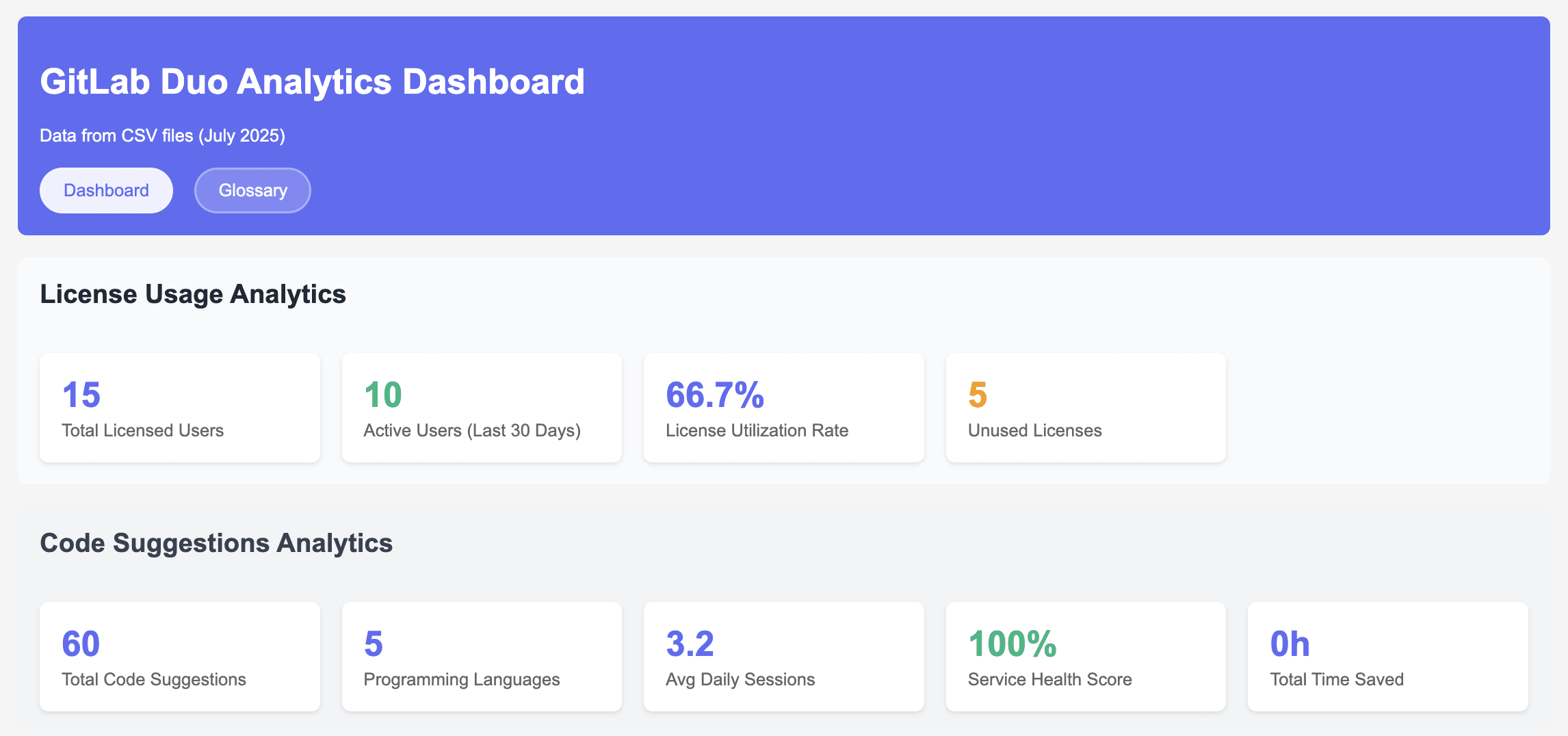
You'll see:
- License utilization: Total licensed users vs. active users (together with code suggestion analytics)
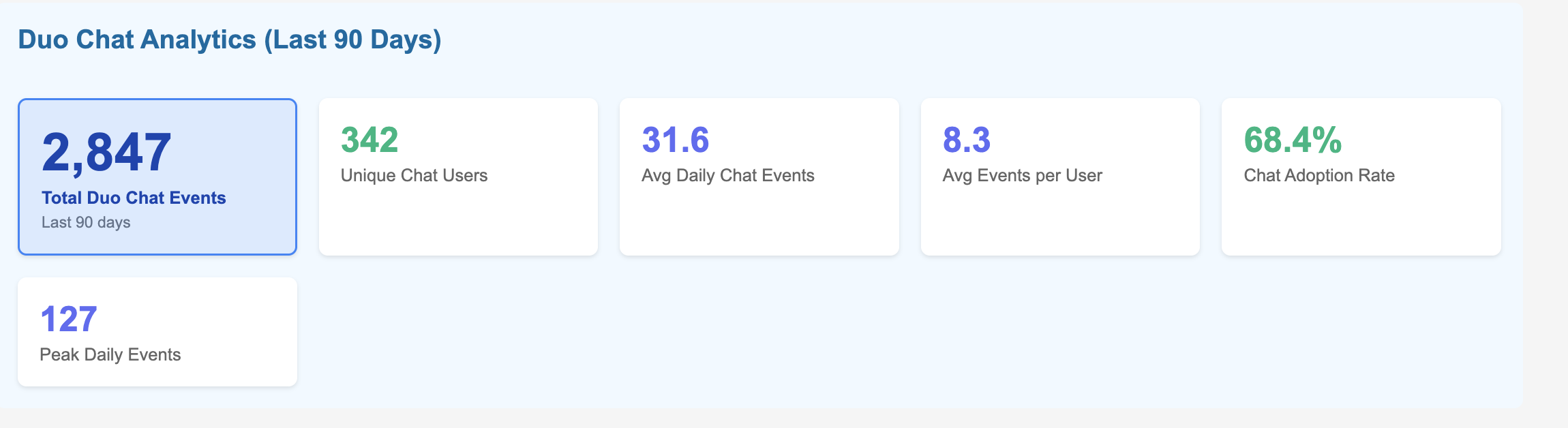
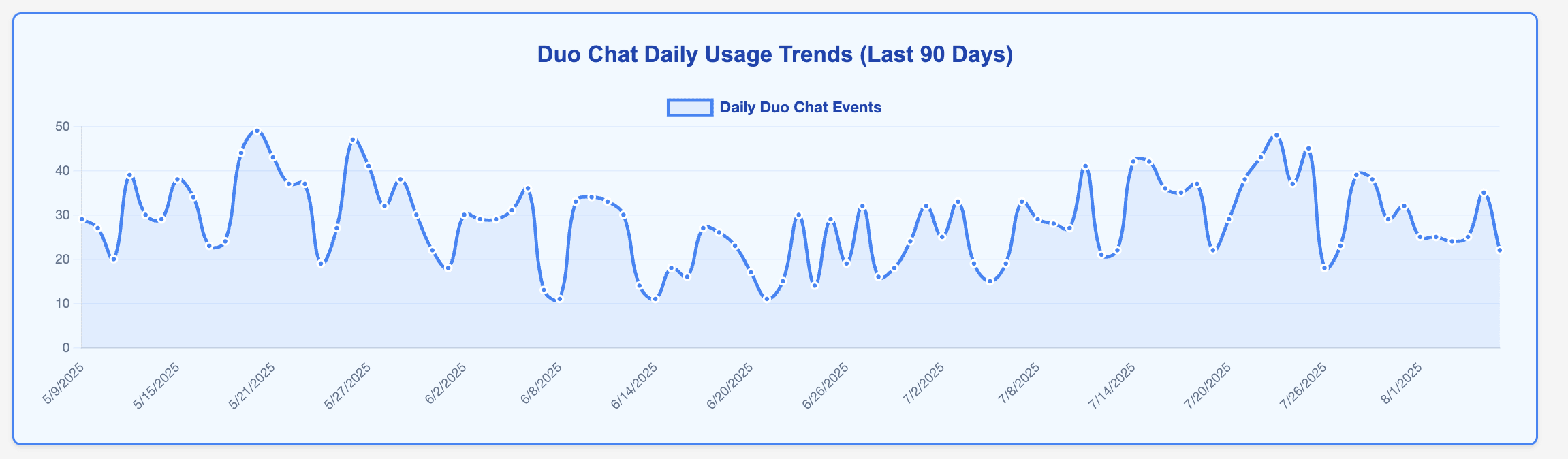
- Duo Chat analytics: Unique Duo Chat users, average Chat events over 90 days, and Chat adoption rate
- Duo engagement analytics: Categorizing Duo usage for a group of users as Power (10+ suggestions), Regular (5-9), or Light (1-4) based on usage patterns
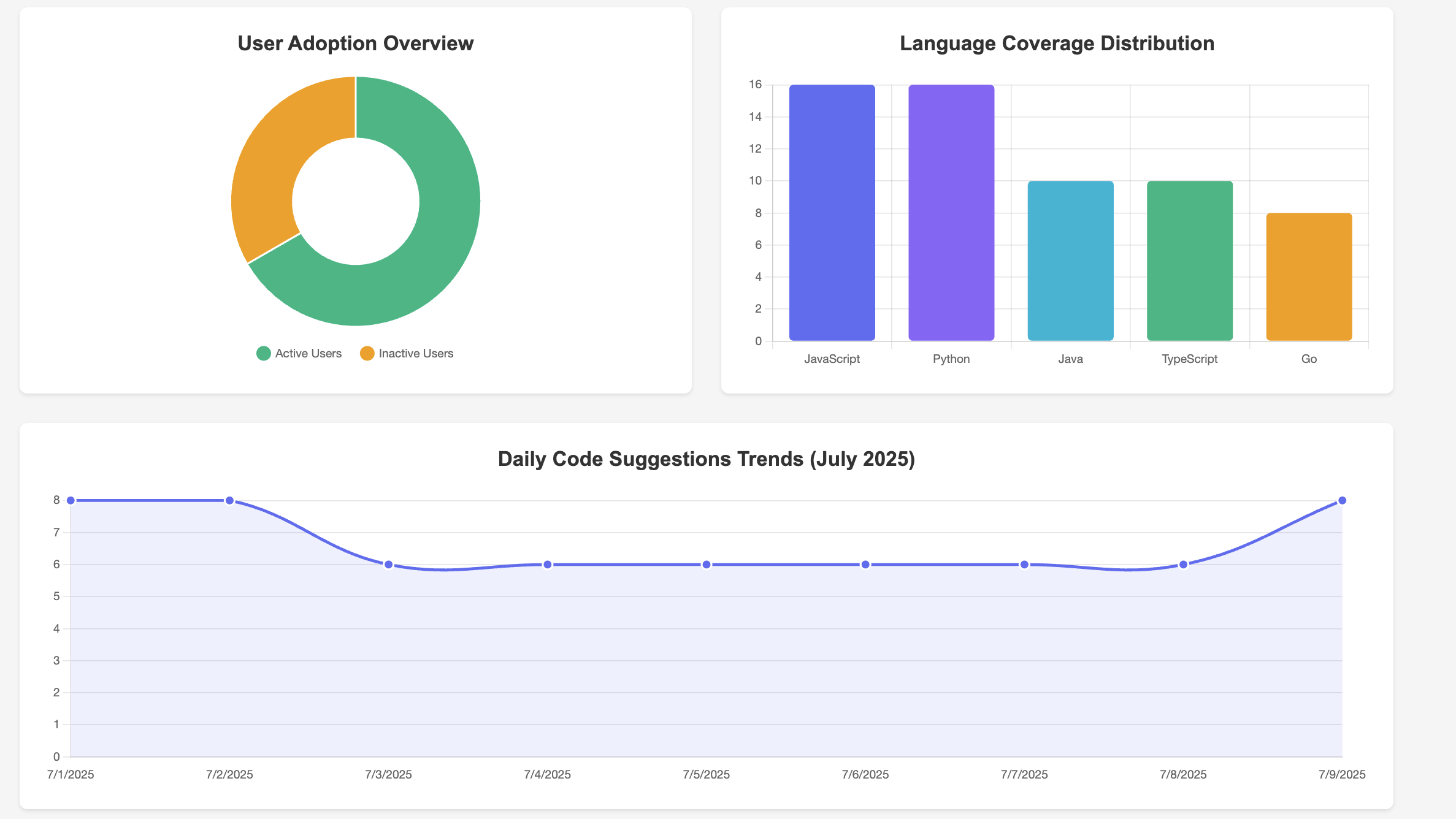
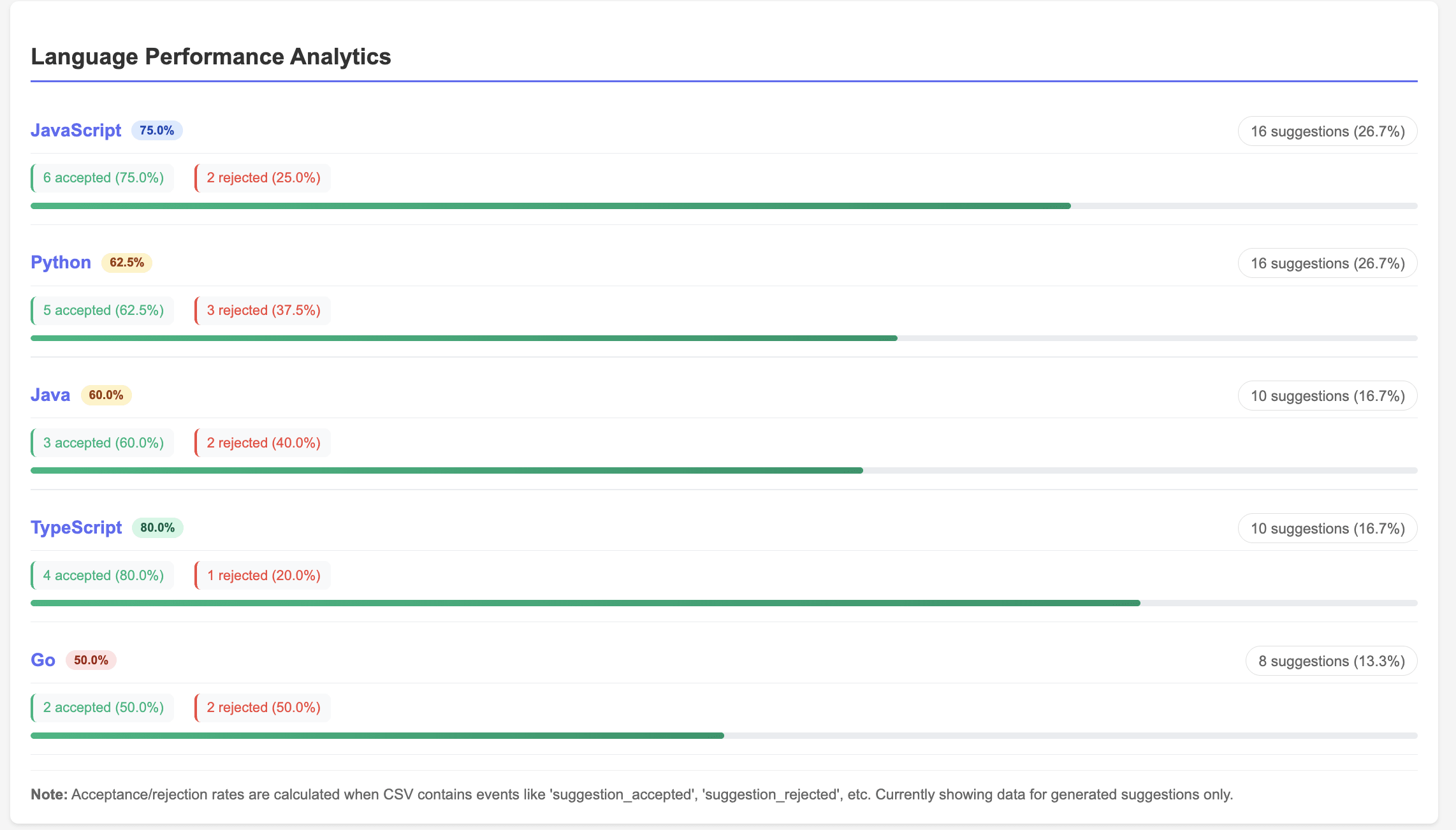
- Usage analytics: Code suggestions by programming language (language coverage distribution), Code suggestions language performance analytics (accepted vs rejected rate)
- Weekly Duo Chat trends: Duo Chat usage patterns
8: (Optional) Launch the React dashboard
For a more interactive experience, you can also run the React dashboard.
Install React dependencies.
cd duo-roi-dashboard
npm install
Start the React app.
npm start
What the React dashboard provides:
- Modern, responsive UI with ,aterial design
- Real-time data refresh
- Dark mode support
- Enhanced visualizations
- Export capabilities
Putting it all together
To demonstrate the power of this integrated analytics solution, let's walk through a complete end-to-end implementation journey — from initial deployment to fully automated ROI measurement.
Start by deploying the containerized solution in your environment using the provided Docker configuration. Within minutes, you'll have both the analytics API and React dashboard running locally.
The hybrid data architecture approach immediately begins collecting metrics from your existing monthly CSV exports while establishing real-time GraphQL connections to your GitLab instance.
Automation through Python scripting
The real power emerges when you leverage Python scripting to automate the entire data collection and processing workflow. The solution includes comprehensive Python scripts that can be easily customized and scheduled.
GitLab CI/CD integration
For enterprise-scale automation, integrate these Python scripts into scheduled GitLab CI/CD pipelines. This approach leverages your existing GitLab infrastructure while ensuring consistent, reliable data collection:
# .gitlab-ci.yml example

duo_analytics_collection:
  stage: analytics
  script:
    - python scripts/enhanced_duo_data_collection.py
    - python scripts/metric_aggregations.py
    - ./deploy_dashboard_updates.sh
  schedule:
    - cron: "0 2 1 * *"  # Monthly on 1st at 2 AM
  only:
    - schedules
This automation strategy transforms manual data collection into a self-sustaining analytics engine. Your Python scripts execute monthly via GitLab pipelines, automatically collecting usage data, calculating ROI metrics, and updating dashboards — all without manual intervention.
Once automated, the solution operates seamlessly: Scheduled pipelines execute Python data collection scripts, process GraphQL responses into business metrics, and update dashboard data stores. You can watch as the dashboard populates with real usage patterns: code suggestion volumes by programming language, user adoption trends across teams, and license utilization rates that reveal optimization opportunities.
The real value emerges when you access the ROI Overview dashboard. Here, you'll see concrete enagagement metrics metrics which can be converted into business impact for your organisation — perhaps discovering that your active Duo users are generating 127% monthly ROI through time savings and productivity gains, while 23% of your licenses remain underutilized. These insights immediately translate into actionable recommendations: expand licenses to high-performing teams, implement targeted training for underutilized users, and build data-driven business cases for broader AI adoption.
Why GitLab?
GitLab's comprehensive DevSecOps platform provides the ideal baseline for enterprise AI analytics and measurement. With native GraphQL APIs, flexible data access, and integrated AI capabilities through GitLab Duo, organizations can centralize AI measurement across the entire development lifecycle without disrupting existing workflows.
The solution's open architecture enables custom analytics solutions like the one developed through our Duo Accelerator program. GitLab's commitment to API-first design means you can extract detailed usage data, integrate with existing enterprise systems, and build sophisticated ROI calculations that align with your organization's specific metrics and reporting requirements.
Beyond technical capabilities, our approach ensures you're not just implementing tools — you're building sustainable AI adoption strategies. This purpose built solution emerging from the Duo Accelerator program exemplifies this approach, providing hands-on guidance, proven frameworks, and custom solutions that address real enterprise challenges like ROI measurement and license optimization.
As GitLab continues enhancing native analytics capabilities, this foundation becomes even more valuable. The measurement frameworks, KPIs, and data collection processes established through custom analytics solutions seamlessly transition to enhanced native features, ensuring your investment in AI measurement grows with GitLab's evolving solution.
Try GitLab Duo today
AI ROI measurement is just the beginning. With GitLab Duo's capabilities you can build out comprehensive analytics. With this you're not just tracking AI usage — you're building a foundation for data-driven AI optimization that scales with your organization's growth and evolves with GitLab's expanding AI capabilities.
The analytics solution developed through GitLab's Duo Accelerator program demonstrates how customer success partnerships can deliver immediate value while establishing long-term strategic advantages. From initial deployment to enterprise-scale ROI measurement, this solution provides the visibility and insights needed to maximize AI investments and drive sustainable adoption.
The combination of Python automation, GitLab CI/CD integration, and purpose-built analytics creates a competitive advantage that extends far beyond individual developer productivity. It enables strategic decision-making, optimizes resource allocation, and builds compelling business cases for continued AI investment and expansion.
The future of AI-powered development is data-driven, and it starts with measurement. Whether you're beginning your AI journey or optimizing existing investments, GitLab provides both the platform and the partnership needed to succeed.
Get started with GitLab Duo today with a free trial of GitLab Ultimate with Duo Enterprise.